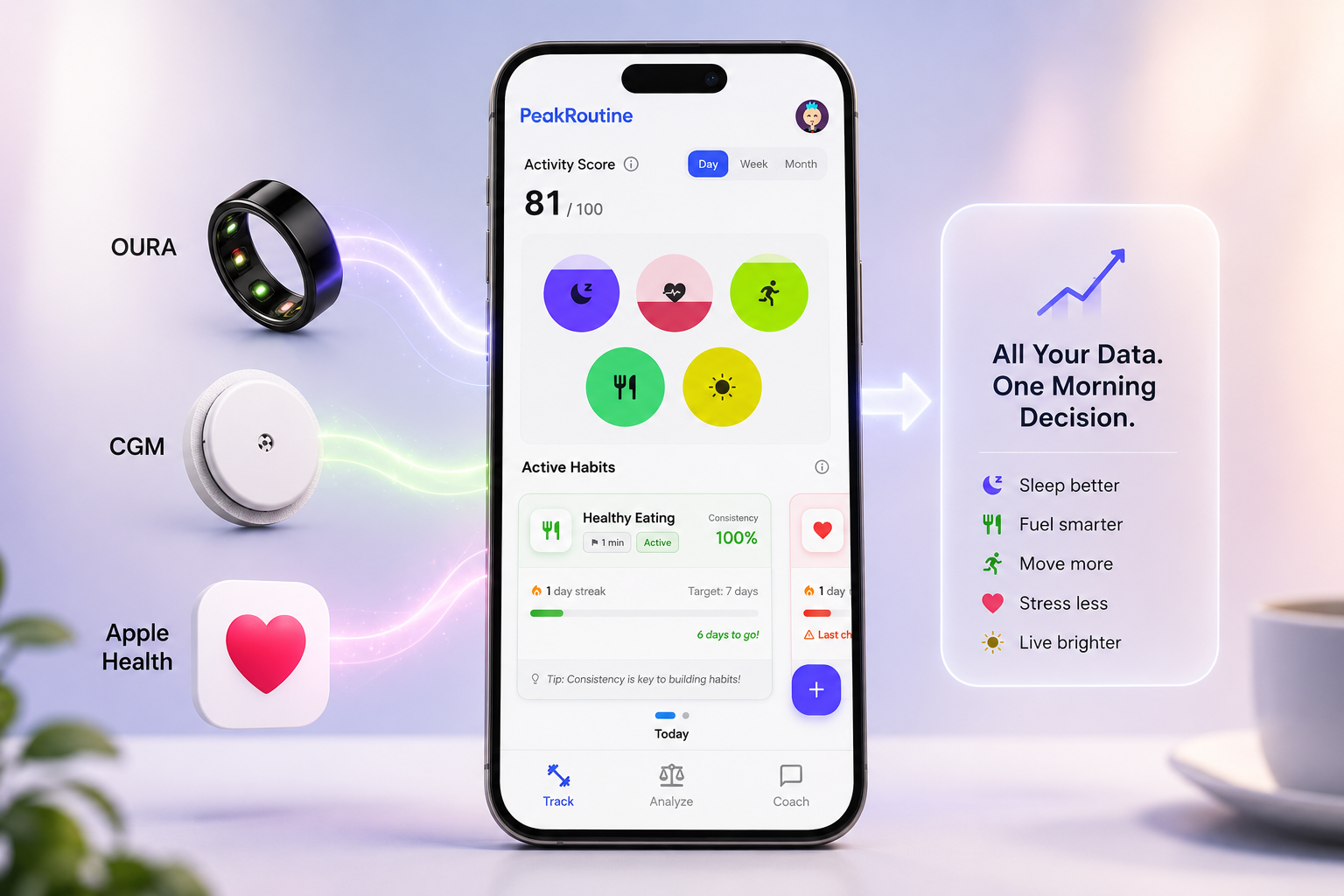
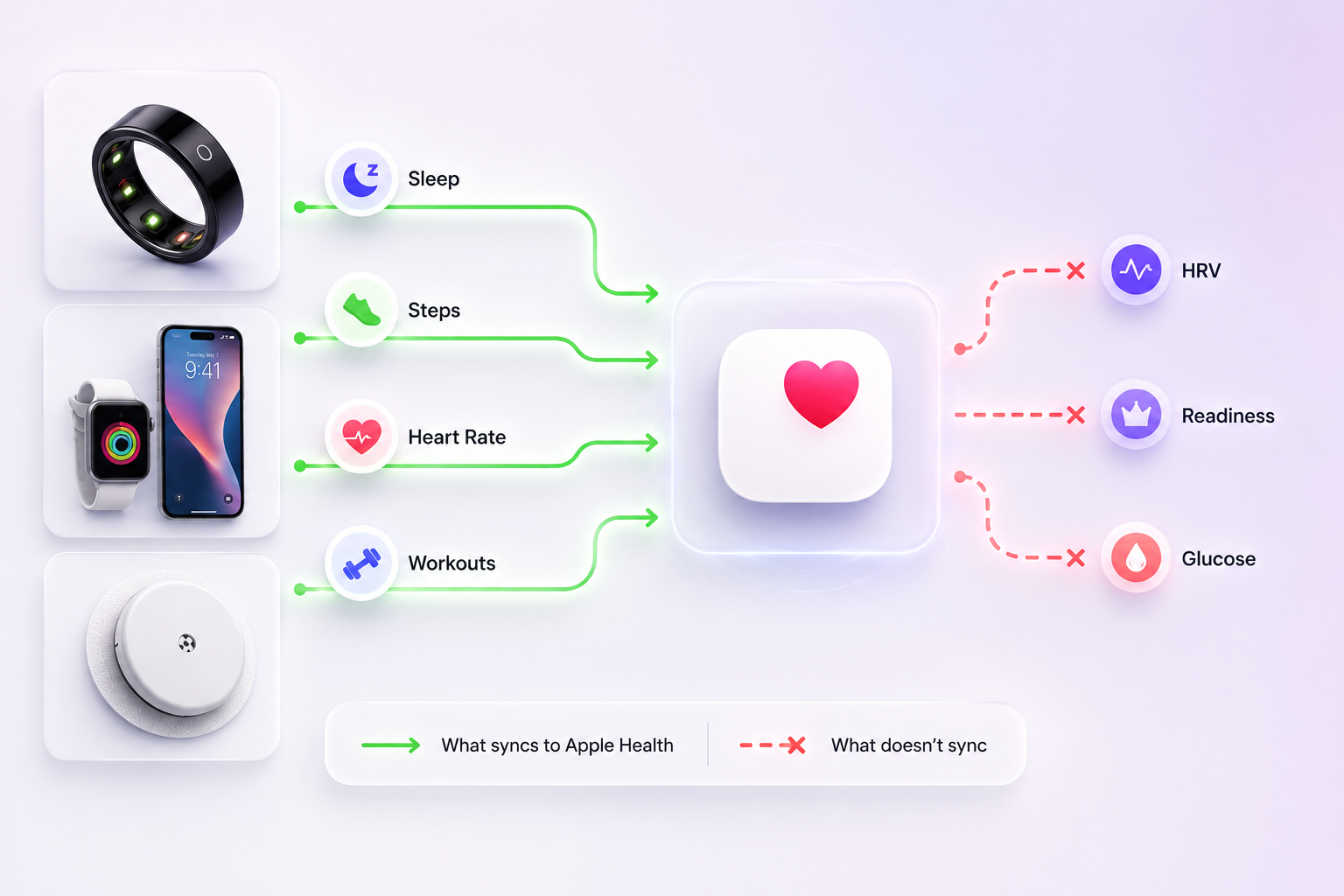
You connected your ring, enabled the toggles, and Apple Health filled up with sleep and steps. Your HRV never arrived, and neither did your Readiness score or your glucose.
Nothing is broken. If you are trying to combine Apple Health, Oura, and CGM data into one view, the constraint is architectural: Oura's published export list simply does not include those metrics, and glucose reaches Oura by a different route that bypasses Apple Health entirely. Knowing which numbers travel and which stay locked in their own app is the difference between a dashboard that looks complete and one you can act on.
What actually syncs from Oura to Apple Health
Per Oura's Member Care documentation, last updated 29 May 2026, the data exported from Oura to Apple Health is: active energy (activity burn calories, excluding basal metabolic rate), heart rate in one-minute intervals, height, mindful minutes, average nighttime respiratory rate, sleep (duration, start time, end time and sleep stages), steps, weight, and workouts with their active calories, distance, duration and type (Oura Member Care, 2026[3]).
Three notable absences: heart rate variability, the Readiness score, and body temperature. Two of those are missing on every platform. The third, HRV, is an iOS-specific omission — more on that below.
At least one widely shared guide states that Readiness syncs to Apple Health. It does not appear on Oura's published export list, and a reader who has built a routine around that assumption will find the field empty.
The reverse direction is narrower still. Apple Health sends back only date of birth, heart rate, height, sex, weight, workout routes, and workouts with their calories, distance, duration and type. Sleep does not come back. Glucose does not go in.
Two eligibility constraints to check before troubleshooting anything: the integration is iOS only, and requires a Gen2 ring, or a Gen3 or later ring with an active membership.
If you are on Android, the picture is different — and better on the metric that matters most.
Oura's Health Connect documentation, last updated 21 July 2026, lists exports from Oura to Health Connect as: active calories burned, distance, exercise, steps, height, weight, sleep, heart rate, and heart rate variability (Oura Member Care, 2026[4]).
Heart rate variability is on the Android list and absent from the iOS one. Android users get the signal iPhone users have to open a second app to see.
The traffic runs deeper in the other direction too. Health Connect can send Oura active and total calories burned, distance, exercise, power, steps, VO2 max, weight, blood pressure and heart rate, against an Apple Health import list limited to date of birth, heart rate, height, sex, weight, workout routes and workouts.
Two things are missing on both platforms: the Readiness score and body temperature. Those stay in the Oura app regardless of which phone you carry. And two things run the other way — Apple Health receives respiratory rate and mindful minutes, which do not appear on the Health Connect list.
| Metric | Apple Health | Health Connect |
|---|---|---|
| Heart rate variability | No | Yes |
| Readiness score | No | No |
| Body temperature | No | No |
| Sleep | Yes (with stages) | Yes |
| Heart rate | Yes | Yes |
| Respiratory rate | Yes | No |
| Mindful minutes | Yes | No |
| Steps, distance, calories, workouts | Yes | Yes |
Health Connect has the same eligibility tiers — Gen2, or Gen3 and later with an active membership — and is Android only. Google Fit integration with Oura is no longer available.
Your CGM is on a different bridge entirely
Glucose does not reach Oura through Apple Health. It arrives through a separate, direct partnership, which is why enabling every Apple Health toggle never produces a glucose field.
Dexcom and Oura announced a strategic partnership in late 2024 to enable two-way data flow between Dexcom glucose biosensors and the Oura Ring and app, alongside a $75 million Dexcom investment in Oura's Series D. The resulting Glucose and Meals features launched in May 2025, putting Stelo glucose data directly into the Oura App. Stelo is worn on the upper arm for up to 15 days and senses glucose every 15 minutes.
The limits are specific. Glucose tracking requires both an Oura Membership and a Stelo account, is available only in the US due to regulatory clearance, and is not available on Gen2 or older rings. Oura does not support other biosensors or continuous glucose monitors, including the Dexcom G7 and G6. And Stelo itself is intended for people aged 18 and up who do not require insulin (Dexcom Stelo, 2024[5]).
So the real architecture is two bridges that do not meet. Glucose and HRV both live inside the Oura app. Apple Health holds sleep, steps, heart rate and workouts. There is no single screen where all of it sits together, and building your routine as though there were is why the setup feels incomplete no matter how many toggles you flip.
Three overlap conflicts, and how to resolve each
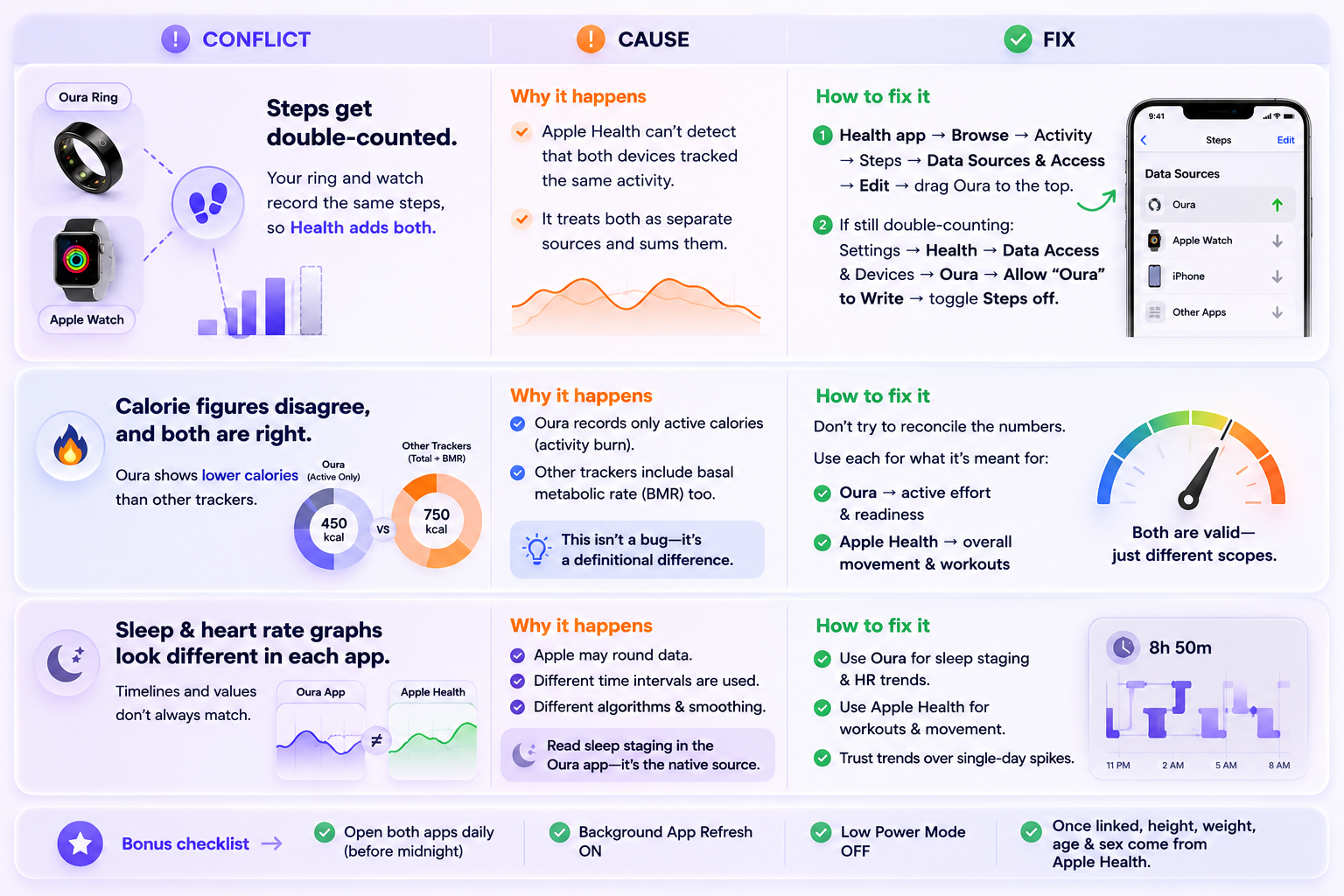
One more failure mode worth knowing, since it looks like a bug: Oura may not import data if both apps were not opened before midnight, if Background App Refresh is disabled, or if Low Power Mode is on. Open both apps once a day. Also note that once you link, your height, weight, age and sex are imported from Apple Health and cannot be edited in Oura unless you unlink.
How to combine Apple Health, Oura, and CGM data into one morning decision
Stop trying to build one dashboard. Build three questions, each answered by a specific pairing, and check only the one that matches today's decision.
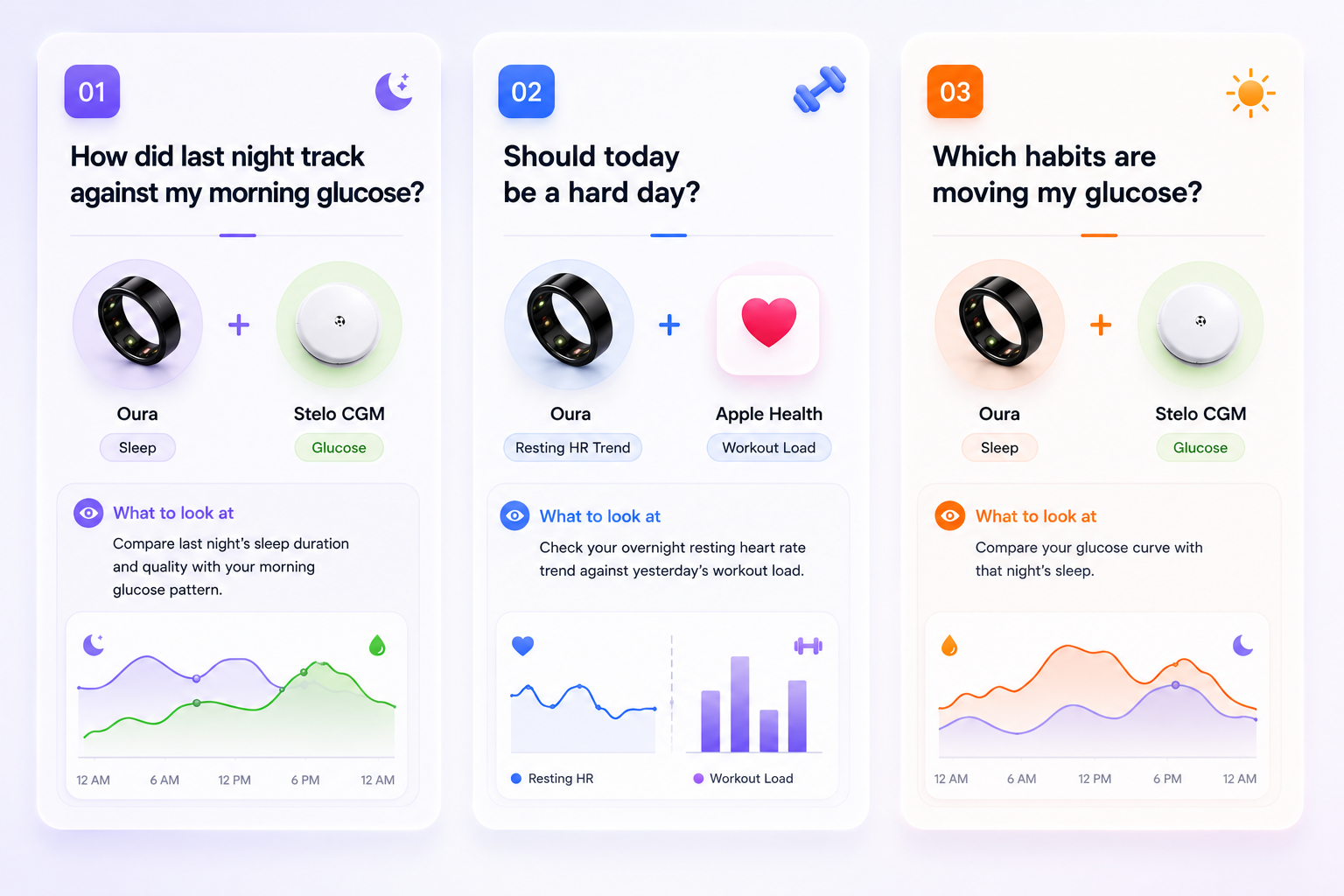
Each question uses two sources, and none requires all three at once. That is the practical reason the single-dashboard goal keeps disappointing people: the decisions were never three-source decisions to begin with.
I came to this pairing from my own numbers. A routine panel put me in the prediabetic range, and the clearest thing in my own tracking was that I had been averaging around five hours of sleep. Sleep was the first variable I changed, and over the following months both my weight and my morning glucose readings shifted. One person's data does not establish cause — see the limitation below — but it is why sleep is the first place I look when a glucose reading surprises me.
Why the sleep–glucose pairing is the one worth building around
Of the three pairings, the sleep-to-glucose link has the deepest experimental support.
In a 12-day inpatient study of 20 healthy men, restricting time in bed to 5 hours a night for one week reduced insulin sensitivity by 20 ± 24% on intravenous glucose tolerance testing (P = 0.001) and by 11 ± 5.5% under euglycemic-hyperinsulinemic clamp (P < 0.04), with no significant change in insulin secretory response (Buxton et al., 2010[1]).
A week in a research ward is not a normal Tuesday, so the more relevant finding is how fast this shows up at home. In a randomised crossover study, ten healthy males spent two nights at half their habitual sleep duration in their own beds. The Matsuda index was 18.6% lower after restriction (P = 0.010) and plasma insulin area under the curve was higher (P = 0.013) (Sweeney et al., 2017[2]).
One important limitation before you draw conclusions from your own data: Both studies measured insulin sensitivity using oral and intravenous glucose tolerance tests and a euglycemic-hyperinsulinemic clamp. Neither used a continuous glucose monitor.
A CGM measures interstitial glucose, which is a related but different quantity, and no study cited here establishes that a consumer CGM will surface these particular changes in an individual. What the research supports is that short sleep is associated with reduced insulin sensitivity under controlled testing — enough to make sleep and glucose a reasonable pairing to observe together, and not enough to treat your CGM curve as a readout of insulin sensitivity. For a closer look at the night itself, see how overnight glucose and sleep shape each other.
The samples were also small and narrow: 20 men and 10 men, all young and healthy. Nothing here is diagnostic, and a CGM used for general wellness is not a test for any condition.
The setup, in order
- Connect Oura to Apple Health. In the Oura app: menu → Settings → under "Data sharing" tap Apple Health → enable Connect to Health and Save Mindful Minutes to Health.
- Set your priority data sources immediately, before you accumulate weeks of double-counted steps.
- Connect Stelo to Oura separately, if you are in the US and eligible. It does not route through Apple Health.
- Decide which app owns which metric. Sleep and glucose: Oura. Workouts and movement: Apple Health. Write it down.
- Pick one of the three questions above and check only that one each morning for two weeks.
Step 4 is the one that requires giving something up, because it means accepting that no single app holds the full picture. Reconciling signals that live in separate apps is the specific problem PeakRoutine was built for: it reads across sources, normalises the overlapping metrics, and returns one call for the day. It's available now on the App Store.
Once you have a pairing you trust, the next step is attaching a specific habit to it — which is a separate exercise covered in our guide to habit stacking for your biometrics.
FAQ
Does Oura sync HRV to Apple Health?
No. Oura's published Apple Health export list covers active energy, heart rate, height, mindful minutes, respiratory rate, sleep, steps, weight and workouts. Heart rate variability is not included, so it has to be read in the Oura app. Notably, Oura's Health Connect integration on Android does export heart rate variability — the gap is specific to iOS, not a limitation of the ring.
How do I stop Oura and Apple Watch double-counting my steps?
Set a priority source. In the Health app go to Browse → Activity → Steps → Data Sources & Access → Edit, then drag Oura to the top. If the problem continues, Oura suggests turning off its permission to write Steps entirely under Settings → Health → Data Access & Devices → Oura.
Can Oura connect to a CGM?
Yes, but only one. Glucose tracking requires an Oura Membership plus a Stelo account, is US-only due to regulatory clearance, and is unavailable on Gen2 or older rings. Other biosensors and CGMs, including the Dexcom G7 and G6, are not supported. Glucose data flows directly into the Oura app rather than through Apple Health.
References
- Buxton OM, Pavlova M, Reid EW, Wang W, Simonson DC, Adler GK. Diabetes. 2010;59(9):2126–33. doi:10.2337/db09-0699. https://pubmed.ncbi.nlm.nih.gov/20585000/
- Sweeney EL, Jeromson S, Hamilton DL, Brooks NE, Walshe IH. Physiological Reports. 2017;5(23):e13498. doi:10.14814/phy2.13498. https://pubmed.ncbi.nlm.nih.gov/29233906/
- Oura Member Care. Apple Health Integration. Last updated May 29, 2026. https://support.ouraring.com
- Oura Member Care. Health Connect by Android Integration. Last updated July 21, 2026. https://support.ouraring.com
- Dexcom. Stelo indications-for-use. 2024.